Work in progress · not yet ready for everyday use

The free office suite,
rebuilt from scratch.

Documents, spreadsheets and presentations in one free, open-source app for macOS, Windows and Linux. OpenDocument by default, Microsoft Office files kept in step.

macOS (Apple silicon and Intel) · Windows · Linux (AppImage) · GPL-3.0
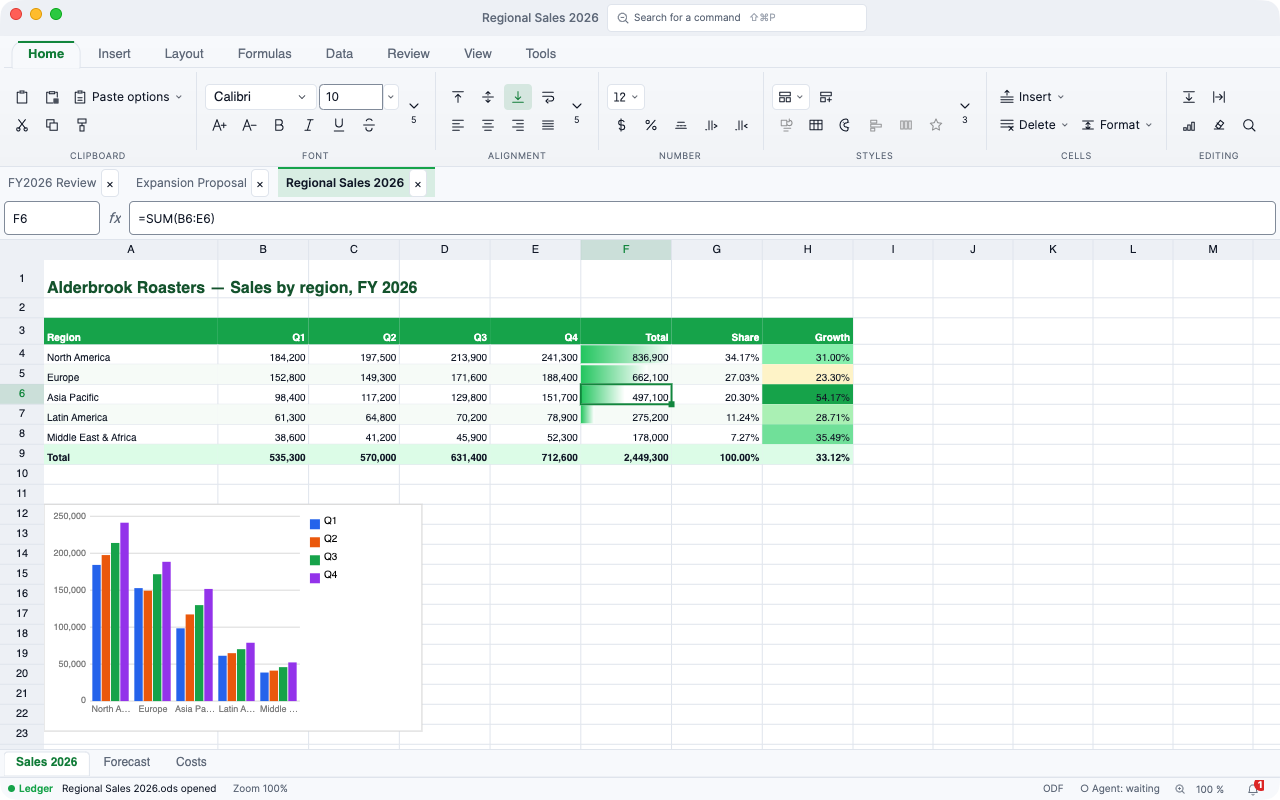
Ledger showing a regional sales sheet with formulas, data bars, a colour scale and a column chart

Ledger: formulas, conditional formatting and charts that travel to the other apps.

Three apps, one core

Everything you write, count and present.

Folio, Ledger and Deck share one engine for text, charts, shapes and tables, so an object made in one app lands in the others as itself, not as a picture.

Folio

Word processing

Long documents done properly, from the first draft to the signed final copy.

  • Styles, sections, columns, headers and footers
  • Tracked changes and threaded comments
  • Tables of contents, indexes, footnotes, mail merge
  • Right-to-left and complex scripts
ODTDOCXRTFHTMLEPUBPDF

Ledger

Spreadsheets

A complete calculation engine, not a subset: all 432 functions of the reference spreadsheets.

  • Pivot tables, filters, scenarios and goal seek
  • Conditional formatting, data bars and colour scales
  • Charts, validation and protection
  • External data: ODBC, SQL Server, PostgreSQL, MySQL, SQLite
ODSXLSXCSVPDF

Deck

Presentations

Every standard layout, transition and animation, kept intact across formats.

  • Themes, masters and custom layouts
  • Entrance, emphasis, exit and motion-path animations
  • Presenter view with notes and timer
  • Export to video
ODPPPTXPDFMP4
Built with care

Open formats, no silent surprises.

PulseOffice writes its own OpenDocument and Office Open XML code. When a file format cannot hold something, it tells you before saving instead of dropping it quietly.

ODF first, Office aligned

OpenDocument is the default. DOCX, XLSX and PPTX are written and read with the same features, or the loss is declared.

Signatures and encryption

Digital signatures in ODF, OOXML and PDF, password and OpenPGP encryption, automatic redaction of metadata.

Macros in JavaScript and Python

An integrated editor with completion and a macro recorder. Macros run in a sandbox: no files, network or processes unless you allow them.

Objects that travel

Copy a chart, a table, a shape or a sheet range from one app to another and it stays editable.

Five languages

English, Italian, German, Spanish and French, including formula names and separators in each language.

Truly cross-platform

The same features on macOS, Windows and Linux, with native menus, light and dark themes, a ribbon and a command palette.
AI agent ready

Bring the AI agent you prefer.

A built-in server speaks MCP, the open Model Context Protocol, so any MCP-compatible agent can read and edit the documents you have open, with the same tools the macros use. It works over local HTTP or through a small stdio bridge for clients that start servers as commands. The sample documents on this page were created by an agent this way.

  • Off by default, local only, protected by an access code
  • Three levels: read, edit, files
  • Every change is one undoable step, labelled as the agent's
  • Anything undo cannot revert asks you first
you › Add a total row and a chart to the sales sheet
 
ledger_sheet_SetFormula F9 = SUM(F4:F8)
ledger_rules_AddDataBar F4:F8
ledger_sheet_AddChart A3:E8 → column
 
✓ Done. Totals come to 2,449,300; Asia Pacific
  grew fastest, at 54%. Undo with ⌘Z.
Free and open source

Get PulseOffice.

Signed installers for every system are on the GitHub releases page. PulseOffice is still in development: expect rough edges and keep backups of important documents.

Or build it yourself with the .NET 10 SDK: dotnet run --project src/PulseOffice.Desktop

Questions

Frequently asked questions

Is PulseOffice free?

Yes. PulseOffice is free and open source under the GPL-3.0 licence, with no subscription and no account.

Can PulseOffice open Microsoft Word, Excel and PowerPoint files?

Yes. It opens and saves DOCX, XLSX and PPTX as well as the OpenDocument formats ODT, ODS and ODP, and warns before saving if a format cannot hold something. See how to open Office files on Linux.

Which systems does PulseOffice run on?

Linux (AppImage for x86_64 and ARM64), Windows (x64 installer) and macOS (Apple silicon and Intel).

Is it an alternative to Microsoft Office?

That is the goal: documents, spreadsheets and presentations with the same file formats, free and on every system. See PulseOffice as a free Microsoft Office alternative.

Is PulseOffice ready for everyday use?

Not yet. It is in active development: try it, report problems on GitHub and keep backups of important documents.